 Ninosaurier
2ddf8961c2
Ninosaurier
2ddf8961c2
Adds the .gitea/ directory to the project structure overview and
corrects the claim that local and CI test environments are identical.
Both are built from the same Dockerfile.test, but locally the image is
built on demand while CI pulls a prebuilt version — see ADR-0002 and
the Technology Architecture doc for details.
306 lines
10 KiB
Plaintext
306 lines
10 KiB
Plaintext
---
|
||
title: 4. Technology Architecture
|
||
description: Technology choices underlying LUNA Charts and how they are structured together.
|
||
sidebar:
|
||
order: 5
|
||
---
|
||
|
||
import { Aside } from '@astrojs/starlight/components';
|
||
|
||
## 1. Overview
|
||
|
||
This Technology Architecture defines the underlying technology decisions for LUNA Charts. It describes the runtime environment, rendering technology, programming language, distribution model, testing strategy, and release pipeline.
|
||
|
||
LUNA Charts is designed as a modern, accessibility-first charting library optimized for web environments, focusing on performance, consistency, and WCAG-oriented rendering behavior.
|
||
|
||
## 2. Rendering Technology
|
||
|
||
### SVG-based Rendering Model
|
||
|
||
LUNA Charts uses **SVG (Scalable Vector Graphics)** as its primary rendering technology.
|
||
|
||
#### Rationale
|
||
|
||
- Enables element-level accessibility (focusable nodes)
|
||
- Supports ARIA attributes per visual element
|
||
- Allows keyboard navigation across chart components
|
||
- Provides native DOM structure for assistive technologies
|
||
- Ensures compatibility with WCAG 2.2 requirements
|
||
|
||
#### Exclusion of Canvas
|
||
|
||
Canvas-based rendering is explicitly excluded because:
|
||
|
||
- It produces pixel-based output without semantic structure
|
||
- Individual chart elements cannot be addressed or focused
|
||
- Accessibility must be simulated externally (insufficient for WCAG goals)
|
||
- It conflicts with the "Accessibility by Design" principle
|
||
|
||
## 3. Programming Language
|
||
|
||
### TypeScript
|
||
|
||
LUNA Charts is implemented in TypeScript.
|
||
|
||
#### Rationale
|
||
|
||
- Strong typing for chart-specific data models
|
||
- Early error detection at compile time
|
||
- Improved developer experience (DX) via IntelliSense
|
||
- Explicit API contracts for all chart components
|
||
- Supports structured accessibility-related metadata
|
||
|
||
#### Architectural Impact
|
||
|
||
- Each chart type has a dedicated strongly typed data model
|
||
- Invalid configurations can be detected before runtime
|
||
- Improves reliability of accessibility-related constraints
|
||
|
||
## 4. Framework Integration Strategy
|
||
|
||
### Framework-Neutral Core with Adapter Layer
|
||
|
||
LUNA Charts is designed as a framework-agnostic system.
|
||
|
||
#### Architecture Model
|
||
|
||
- Core rendering and logic are framework-independent
|
||
- Framework-specific adapters provide integration layers
|
||
|
||
#### Supported Environments
|
||
|
||
- React
|
||
- Vue
|
||
- Angular
|
||
- Web Components
|
||
|
||
#### Rationale
|
||
|
||
- Prevents vendor lock-in
|
||
- Ensures consistent behavior across frameworks
|
||
- Aligns with "Framework Agnosticism" principle (P02)
|
||
- Maximizes adoption across ecosystems
|
||
|
||
## 5. Distribution Strategy
|
||
|
||
### Single-Package Consumption Model
|
||
|
||
LUNA Charts is distributed as a single unified package.
|
||
|
||
#### Characteristics
|
||
|
||
- No plugin system
|
||
- No external extensions by consumers
|
||
- All functionality is included in the core distribution
|
||
|
||
#### Example Usage
|
||
|
||
```bash
|
||
npm install luna-charts
|
||
```
|
||
|
||
```jsx
|
||
<BarChart data={...} />
|
||
```
|
||
|
||
#### Rationale
|
||
|
||
- Simplifies developer experience
|
||
- Ensures consistent API behavior
|
||
- Maintains strict control over accessibility compliance
|
||
- Avoids fragmentation of implementation quality
|
||
|
||
## 6. Testing & Quality Strategy
|
||
|
||
LUNA Charts follows a multi-layer quality assurance model.
|
||
|
||
### 6.1 Functional Testing
|
||
|
||
- Unit Tests for core logic
|
||
- Ensures correctness of rendering pipeline
|
||
|
||
### 6.2 Accessibility Testing
|
||
|
||
- Automated accessibility validation tools
|
||
- Checks WCAG-related constraints where machine-verifiable
|
||
- Ensures ARIA structure correctness
|
||
|
||
### 6.3 Code Quality (Linting)
|
||
|
||
- Enforces architectural consistency
|
||
- Prevents API misuse patterns
|
||
- Ensures maintainable code structure
|
||
|
||
### 6.4 Visual Regression Testing
|
||
|
||
- Ensures SVG rendering stability
|
||
- Detects unintended layout or structural changes
|
||
- Validates accessibility-relevant DOM consistency
|
||
|
||
### 6.5 Usability Testing
|
||
|
||
- Manual or moderated usability sessions with representative developers/end users
|
||
- Validates real-world developer experience and end-user comprehension of charts
|
||
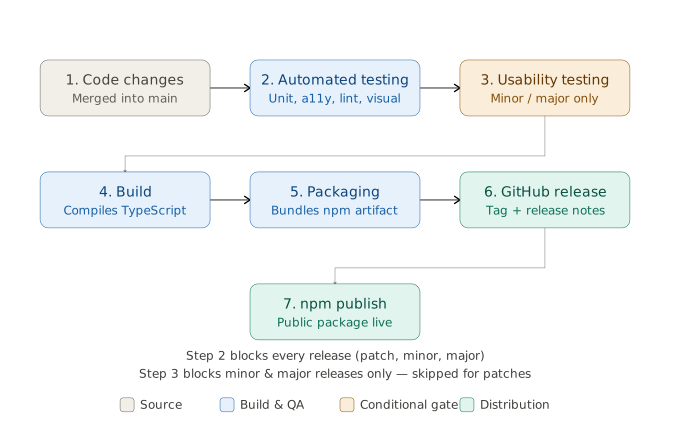
- Required for **minor and major releases** (new chart types, API changes, significant UX changes)
|
||
- **Not required for patch releases** (bug fixes, internal refactors with no user-facing change)
|
||
|
||
<Aside type="caution" title="Release Gate Policy">
|
||
Automated testing (unit, accessibility, linting, visual regression) is a **blocking condition for every release**. Usability testing is a **blocking condition for minor and major releases**, but is skipped for patch releases to avoid delaying critical fixes.
|
||
</Aside>
|
||
|
||
### 6.6 Test Execution Environment
|
||
|
||
Component and browser tests (Vitest browser mode, see ADR-0002) run inside
|
||
a **containerized Playwright environment** rather than directly on
|
||
contributor or CI host machines.
|
||
|
||
#### Characteristics
|
||
|
||
- A dedicated `Dockerfile.test`, based on the official Playwright container
|
||
image, provides a reproducible browser environment with pinned browser
|
||
versions
|
||
- Locally, `docker-compose.test.yaml` builds this image from source and
|
||
orchestrates test execution, isolating dependencies from the host system
|
||
- In Continuous Integration, the same `Dockerfile.test` is built and
|
||
pushed to the project's container registry out-of-band (tagged by
|
||
Playwright version, e.g. `luna-charts-test:v1.62.1`); CI jobs pull this
|
||
prebuilt image directly rather than rebuilding it on every run, then
|
||
check out the current commit and install dependencies inside the running
|
||
container before executing tests
|
||
- `Dockerfile.test` remains the single source of truth for the test
|
||
environment definition in both cases — only *when* the image is built
|
||
(on demand locally, ahead of time for CI) differs
|
||
|
||
#### Rationale
|
||
|
||
- Ensures deterministic, reproducible accessibility and browser test
|
||
results independent of the host operating system
|
||
- Removes the need for contributors to install and maintain matching
|
||
Playwright browser binaries locally
|
||
- Avoids rebuilding the Playwright/browser image on every CI run, which
|
||
would otherwise require Docker-in-Docker access inside the CI runner —
|
||
significant infrastructure complexity for a single-service image build
|
||
- Aligns automated testing (Section 6.1–6.4) with a single,
|
||
version-controlled execution environment definition, even though the
|
||
build trigger differs between local development and CI
|
||
|
||
## 7. Release & Distribution Model
|
||
|
||
### Open Source Release Pipeline
|
||
|
||
LUNA Charts is developed as an open-source project.
|
||
|
||
#### Distribution Flow
|
||
|
||
|
||
|
||
#### Versioning Strategy
|
||
|
||
Semantic Versioning (SemVer):
|
||
|
||
- MAJOR: breaking API or chart model changes
|
||
- MINOR: new features or chart types
|
||
- PATCH: bug fixes and accessibility improvements
|
||
|
||
## 8. Runtime Environment
|
||
|
||
### Modern Browser & Mobile Support
|
||
|
||
LUNA Charts targets modern web environments.
|
||
|
||
#### Constraints
|
||
|
||
- Modern browsers only (Evergreen browsers)
|
||
- Mobile-first compatibility
|
||
- No legacy browser support
|
||
|
||
#### Rationale
|
||
|
||
- Enables SVG-first accessibility design
|
||
- Reduces polyfill and compatibility overhead
|
||
- Improves performance and maintainability
|
||
|
||
## 9. Key Architectural Decisions
|
||
|
||
- SVG is the only rendering technology (Canvas excluded)
|
||
- TypeScript is used for strict typing and API contracts
|
||
- Framework-neutral core with adapter layers
|
||
- Single-package distribution model
|
||
- No plugin or extension system
|
||
- Multi-layer testing strategy with release gating
|
||
- Containerized, reproducible test execution environment for browser and accessibility tests
|
||
- Open-source distribution via GitHub and npm
|
||
- Modern browser and mobile-first runtime strategy
|
||
|
||
## 10. Trade-offs
|
||
|
||
### Advantages
|
||
|
||
- Strong accessibility guarantees
|
||
- Predictable and deterministic rendering
|
||
- High developer experience (DX)
|
||
- Consistent cross-framework behavior
|
||
- Simplified integration model
|
||
- High quality assurance via release gates
|
||
|
||
### Limitations
|
||
|
||
- Limited extensibility for external developers
|
||
- Reduced customization flexibility
|
||
- Strict architectural constraints
|
||
- No plugin ecosystem
|
||
- Higher responsibility on core maintainers
|
||
|
||
## 11. Change Log
|
||
|
||
This document reflects a refined Technology Architecture based on iterative architectural decisions across Phase A (Vision), Phase B (Business Architecture), and Phase C (Application Architecture). Key clarifications introduced in this phase:
|
||
|
||
- SVG confirmed as the only rendering technology due to accessibility requirements
|
||
- Accessibility is treated as a cross-cutting concern supported by type safety, runtime validation, and internal quality assurance (not a standalone engine)
|
||
- Framework neutrality enforced through adapter-based architecture
|
||
- Distribution model defined as a single-package open-source release via npm and GitHub
|
||
- Testing strategy defined as a multi-layer quality gate system (unit, accessibility, linting, visual regression)
|
||
- Runtime scope restricted to modern browsers and mobile-first environments for performance and accessibility alignment
|
||
|
||
### 2026-07-17 – Containerized test execution documented
|
||
|
||
**Reason**
|
||
|
||
Component and browser tests are executed inside a Docker-based Playwright environment (`Dockerfile.test`, `docker-compose.test.yaml`), which was introduced during implementation but had not yet been reflected in this document.
|
||
|
||
**Changes**
|
||
|
||
- Added Section 6.6 "Test Execution Environment" describing the containerized Playwright setup used for local development and CI
|
||
- Added "Containerized, reproducible test execution environment" to Section 9 "Key Architectural Decisions"
|
||
|
||
**Impact**
|
||
|
||
This clarifies an already-implemented part of the testing strategy (Section 6) and does not change any other architectural decision in this document.
|
||
|
||
### 2026-08-04 – CI uses a prebuilt test image instead of rebuilding per run
|
||
|
||
**Reason**
|
||
|
||
The initial implementation of Section 6.6 assumed CI would build
|
||
`Dockerfile.test` fresh on every run, identical to local execution. In
|
||
practice, this required Docker-in-Docker access inside the CI runner
|
||
purely to build a single-service image — disproportionate operational
|
||
complexity (privileged sidecar container, custom pod networking,
|
||
runner-level configuration) for the orchestration value actually needed,
|
||
since `docker-compose.test.yaml` defines only one service with no
|
||
inter-service dependencies.
|
||
|
||
**Changes**
|
||
|
||
- Section 6.6 updated to describe the actual CI flow: `Dockerfile.test` is
|
||
built and pushed to the registry out-of-band (not on every CI run), and
|
||
CI jobs pull the prebuilt image, then check out the current commit and
|
||
install dependencies at runtime
|
||
- Clarified that `Dockerfile.test` remains the single source of truth for
|
||
the test environment definition; only the build trigger differs between
|
||
local and CI usage
|
||
|
||
**Impact**
|
||
|
||
No other architectural decision in this document is affected. Local
|
||
component testing (`pnpm test:component`) is unchanged. |